

RECRUSO brings worker records, bookings, compliance, timesheets, payroll and invoicing into one platform built around recruitment agency operations. Manage connected workforce records from worker entry and shift fulfilment through to approved hours, payroll preparation and client billing.
Why choose RECRUSO:
- Manage workers and bookings in the same operational system.
- Connect compliance and work-hour records with agency activity.
- Carry approved workforce data into payroll and invoicing.
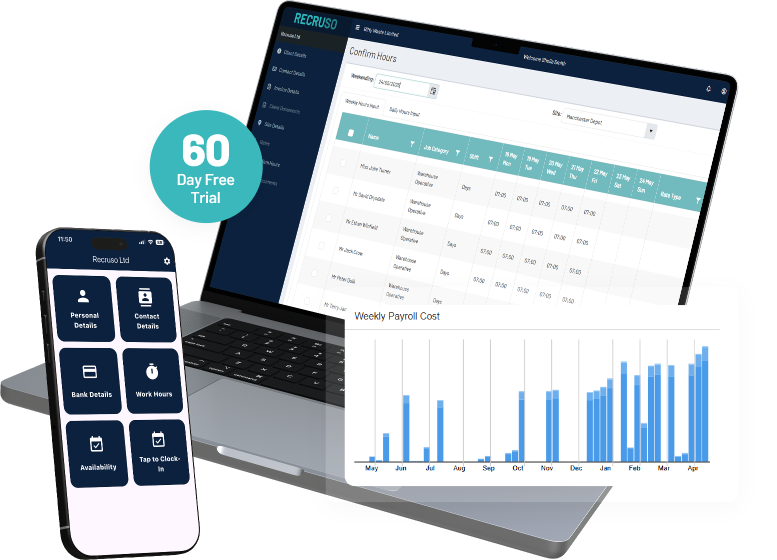
What is workforce management software?
Workforce management software organises the records and tasks used to assign workers, record activity, review hours and prepare payment data. In a recruitment agency, it can connect workers, bookings, compliance, timesheets, payroll and invoicing within one operational process.
WFM software is not always the same as employee management or HR software. HR systems commonly focus on employment records, leave, benefits and performance. Recruso is positioned around recruitment agency workflows and agency workers.
Within RECRUSO, the verified workforce process covers:
- Worker entry and records
- Bookings and shift fulfilment
- Time and attendance
- Compliance records
- Client approvals
- Timesheets or work hours
- Payroll
- Invoicing
Who is RECRUSO workforce management software for?
Recruso is intended for recruitment agencies managing temporary, mobile or shift-based workers and the records connected with their work.

Recruitment agencies
Keep worker records, bookings, compliance, hours, payroll and invoicing connected across temporary recruitment activity.

Recruitment consultants
Work from current worker and booking records when managing assignments and shift fulfilment.

Operations teams
Review workforce records, compliance information, approvals and process status across agency activity.

Payroll and finance teams
Use approved work records as part of payroll preparation and client invoicing.

Agency owners and directors
Review how operational records move between recruitment, workforce administration and finance.
How Perm Recruitment Software Works
Perm recruitment software works best when each stage of the placement process shares the same data. RECRUSO connects candidate records, client activity, vacancies, shortlists, placement progress and reporting so teams do not have to keep copying information from one place to another.
1.
Worker entry and records
Create and maintain the worker information used across recruitment activity.
2.
Bookings and shift fulfilment
Connect workers with bookings and monitor fulfilment records.
3.
Time and attendance
Record start and finish times and send worked hours to the agency.
4.
Compliance records
Keep workforce compliance information connected with worker activity.
5.
Client approvals
Include client review and approval within the wider workforce process.
6.
Timesheets and work hours
Carry recorded hours into agency review and payment preparation.
7.
Payroll preparation
Connect placements, timesheets and payroll records.
8.
Invoicing
Use workforce and payment records as part of the client billing process.
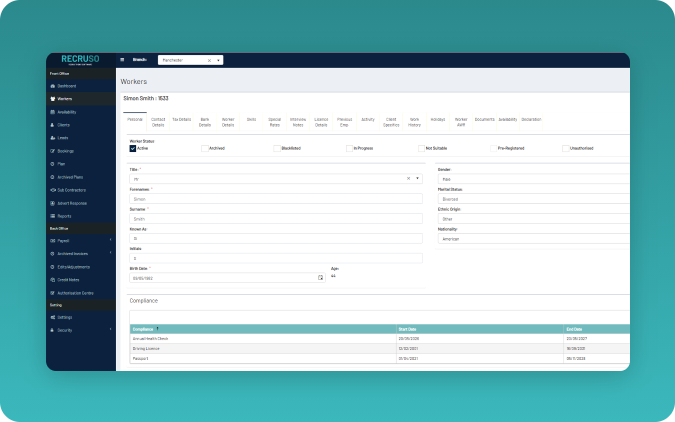
Worker records and entry
Keep worker information connected to live recruitment activity
RECRUSO supports worker entry and keeps worker records connected with bookings, compliance and payment activity.
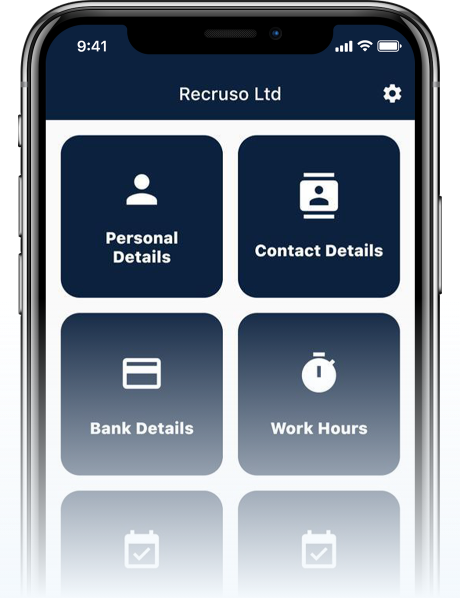
Agency staff can work from the same worker record as information moves through the recruitment process. Through the RECRUSO Worker App, agency workers can also update their personal and bank details.
Can workers update their own details?
Yes. The published RECRUSO Worker App listing states that workers can change personal and bank details through the app.
The exact fields, approval steps and staff permissions depend on the configured process.
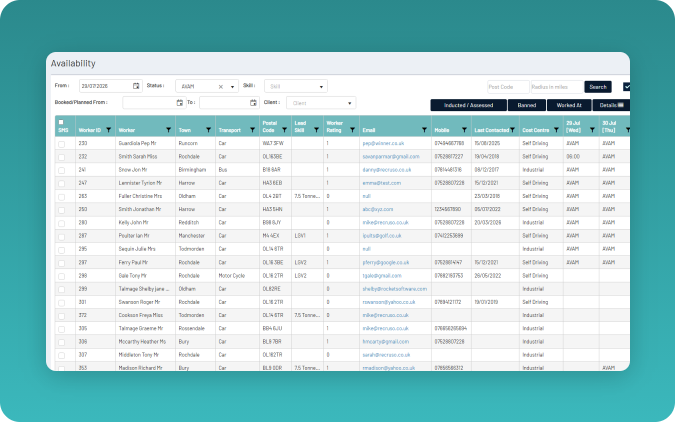
Manage bookings and shift fulfilment from current worker records
RECRUSO connects booking and shift-fulfilment activity with current worker records, helping consultants manage assignments within the wider recruitment process.
Time and attendance
Record worker hours for agency review and payment
Agency workers can enter their start and finish times through the Work Hours screen in the RECRUSO Worker App. Those hours are then sent to the agency ready for payment.
How do workers submit their hours?
Workers enter start and finish times in the Work Hours screen. RECRUSO then sends the recorded hours to the agency.
The final product copy should also explain how the agency reviews entries, requests corrections and handles breaks, overtime or missed records.
Mobile workforce access
Give agency workers access through the RECRUSO Worker App
The RECRUSO Worker App gives agency workers mobile access to verified self-service and work-hour functions.
What can workers do in the RECRUSO app?
Workers can:
- Update personal details
- Update bank details
- Enter start and finish times
- Send recorded hours to the agency
- Enter daily or weekly periods of availability for driver records
Compliance records
Keep workforce compliance information connected to worker activity
RECRUSO builds compliance into the recruitment process, keeping important compliance information connected to each worker and their bookings.
For example, drivers can record their daily or weekly availability directly through the Worker App. This gives agencies a clear record of working patterns and helps them manage Working Time Directive requirements alongside day-to-day workforce planning.
Potential areas for approved copy include:
- Required worker documents
- Expiry dates
- Compliance status
- Reminders
- Role or client requirements
- Right-to-work records
- Driver records
- Warning or blocking behaviour
- Compliance reporting
Connect client approvals with workforce and payment records
Client approvals form part of Recruso’s temporary recruitment process, helping connect reviewed workforce records with later payroll and invoicing activity.
Payroll and invoicing connection
Move approved workforce records into payroll and invoicing
RECRUSO connects placements, timesheets and payroll, allowing workforce records to continue into the agency’s payment process. Its broader recruitment platform also includes invoicing.
| Stage | Record | Main user | Next step |
|---|---|---|---|
| Booking | Worker assignment | Consultant | Hours recorded |
| Work completed | Work hours or timesheet | Worker | Agency or client review |
| Approval | Approved hours | Agency or client | Payroll preparation |
| Payroll | Pay data | Payroll team | Worker payment |
| Billing | Charge data | Finance team | Client invoice |
RECRUSO also offers recruitment agencies the choice of managing payroll through the software or using an outsourced payroll service.
How workforce management works in RECRUSO
RECRUSO keeps workforce records connected throughout the entire recruitment agency process, rather than managing each task in isolation.
1.
Create or update the worker record.
Agency staff enter or maintain the information needed for recruitment activity.
2.
Check required worker information.
Relevant compliance information is reviewed before the worker progresses.
3.
Assign the worker to a booking or shift.
The worker record is connected with client demand and fulfilment activity.
4.
Record completed hours.
Workers can enter start and finish times through the Work Hours screen.
5.
Review or approve the hours.
The agency or client checks the relevant record before payment preparation.
6.
Prepare payroll data.
Approved workforce information moves into the payroll process.
7.
Prepare client billing.
Connected charge information supports invoicing.
8.
Review operational reporting.
What each recruitment team can manage
The same connected workforce records can support several teams within a recruitment agency.
Agency owners and directors
Review operational records across recruitment, workforce administration and finance.
Consultants
Manage worker records, bookings, shift fulfilment and compliance checks.
Operations teams
Monitor workforce records, approvals, exceptions and process status.
Payroll and finance teams
Work with approved hours, payroll preparation and invoicing records.

Agency workers
Update personal and bank details, enter work hours and, for driver records, submit periods of availability.
Clients
Review and approve relevant records.
What to check when choosing workforce management software
A useful workforce management platform should be able to fit your agency’s recruitment process, user roles and finance requirements. Use these questions when comparing providers or attending a product demonstration.
At RECRUSO we are proud to say we can support the implementation of our temp and perm recruitment software – making sure it works exactly how your business needs it to.
- Does the software fit temporary recruitment workflows?
- Can it connect workers, bookings and worked hours?
- Can workers update their records or submit hours?
- How are client approvals handled?
- How does approved data reach payroll?
- Which payroll and accounts systems connect?
- Which compliance records are supported?
- What user roles and permissions are available?
- What mobile access is provided?
- Which reports are available?
- How is agency and worker data protected?
- What support is included?
- What does implementation involve?
- How is pricing structured?
Workforce management software FAQs
Workforce management software connects records and tasks used to assign workers, track activity, review hours and prepare payment data. Recruso applies these functions to recruitment agencies by connecting workers, bookings, compliance, timesheets, payroll and invoicing.
It helps an agency manage records across worker entry, bookings, shift fulfilment, time and attendance, compliance, approvals, payroll and invoicing. The exact functions vary between products and configurations.
Yes. RECRUSO provides specialist software for temp recruitment agencies, helping teams manage the entire recruitment process from candidate registration and compliance through to bookings, timesheets, payroll and invoicing. By bringing front and back-office processes into one platform, Recruso helps temporary recruitment agencies reduce admin, improve visibility and manage high volumes of workers more efficiently.
Yes. Workers can enter start and finish times in the Work Hours screen of the RECRUSO Worker App. The recorded hours are sent to the agency ready for payment.
Yes. The RECRUSO Worker App allows workers to update personal and bank details, enter start and finish times and submit periods of availability for driver records.
Yes. RECRUSO offer multiple solutions for payroll, including our own payroll software and our out-sourced payroll service.
Workforce management software commonly focuses on worker deployment, hours and connected operational records. Employee management software commonly covers HR matters such as leave, benefits and performance. Recruso is positioned around recruitment agency activity rather than broad HR administration.
See how RECRUSO could manage your workforce process
Book a RECRUSO demonstration to see how the software connects worker records, bookings, compliance, work hours, client approvals, payroll and invoicing for a recruitment agency.