

RECRUSO helps recruitment agencies manage temporary staffing bookings and the records used to move each shift from client demand to worker assignment, worked hours, payroll and invoicing.
Keep workers, staffing bookings and related recruitment records connected as your team reviews demand, assigns workers and follows each booking through the shift-fulfilment process.
Why Choose RECRUSO:
- Manage worker and staffing booking records within the same recruitment process.
- Connect worker assignment with relevant worker and compliance information.
- Follow staffing activity from client demand through to completed work.
- Carry approved work records into payroll and client invoicing.
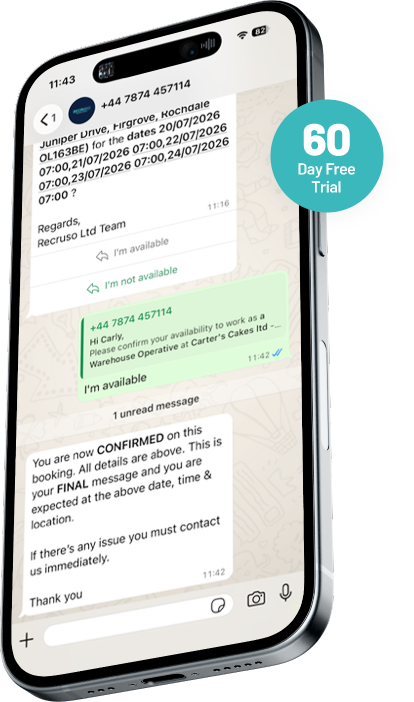
What is staffing software?
Staffing software helps a recruitment or staffing agency manage temporary workers, client requirements, bookings and the records connected with shift-based work. Depending on the provider, it may support the process from an open staffing requirement to worker assignment, completed hours, approval, payroll and client billing.
RECRUSO is staffing software for recruitment agencies. This page centres on shift fulfilment, with wider temporary recruitment, workforce, time, payroll and invoicing activity shown as connected parts of the process.
Software categories and workflows vary between providers. Buyers should compare the functions and record stages used by their own agency.
A staffing process may include:
- Receive or record a client staffing requirement.
- Review relevant worker records.
- Check applicable availability, suitability and compliance information.
- Assign a worker to a booking.
- Review the fulfilment position.
- Respond to changes or staffing gaps.
- Record the completed work.
- Review or approve worked hours.
- Continue the approved record into payroll and invoicing.
Who is RECRUSO staffing software for?
RECRUSO staffing software is intended for recruitment agencies managing temporary workers, client bookings and shift-based recruitment activity. It is not positioned here as employee scheduling software for an employer’s internal workforce.

Temporary recruitment agencies
Manage temporary worker records, client bookings, shift fulfilment and connected pay-and-bill activity.

Staffing agencies
Coordinate client staffing requirements and worker assignments across agency operations.

Recruitment consultants
Work with worker and booking records while filling client requirements.

Operations and booking teams
Review staffing demand, worker readiness, assignments, changes and fulfilment status.

Branch managers
Review booking activity and staffing gaps across a branch.

Payroll and finance teams
Use completed and approved work records within payroll and invoicing processes.

Agency owners and directors
Review how staffing activity moves from recruitment operations into worker payment and client billing.
Manage shift fulfilment from staffing demand to worker assignment
Shift fulfilment is the process of moving from a client staffing requirement to the required worker position for a booking. It includes more than assigning one worker. The agency may also need to record demand, review worker information, monitor coverage, respond to changes and connect completed work with later time and payment records.
1.
Demand
The client requirement records the work that needs to be covered, including approved booking details.
2.
Booking
The requirement is held as a staffing booking within the recruitment process.
3.
Worker assignment
A selected worker is connected with the client requirement.
4.
Shift fulfilment
The agency reviews whether the required staffing position has been reached.
5.
Shift completion
The work takes place and the relevant hours are recorded.
6.
Approval and payment
The completed work record continues into approval, payroll and invoicing.
RECRUSO connects bookings, workers and later work records within its temporary recruitment process. The exact stages, status names and actions must reflect the live product.
Record client staffing requirements as bookings
A staffing booking gives the agency a defined client requirement to fill. It keeps the demand connected with the worker assignment, fulfilment position and completed work record.
Once approved, the booking record can give the agency a clear requirement against which worker assignments and later work records can be reviewed.
A booking may need to record:
- client
- site or workplace
- role and required skills
- number of workers required
- date, start and finish time
- pay and charge information
- booking notes
Respond when staffing requirements change
Temporary staffing requirements can change before or after a worker has been assigned. The relevant booking and assignment records should show the current position and the actions taken by the agency.
Common scenarios may include:
- the client increases or reduces the number of workers required
- the booking time changes
- the site changes
- the role requirement changes
- a worker becomes unavailable
- a worker declines or cancels
- the client cancels the booking
- an assignment needs to be replaced
- the requirement remains partly filled
- a completed work record is queried
Carry approved staffing records into payroll and invoicing
RECRUSO connects placements, timesheets and payroll and includes invoicing within its temporary recruitment process. This keeps the completed staffing record connected with the later pay-and-bill stages. This could include:
- Client staffing requirement
- Worker assignment
- Completed shift
- Worked hours
- Approval
- Payroll preparation
- Worker payment
- Client invoice
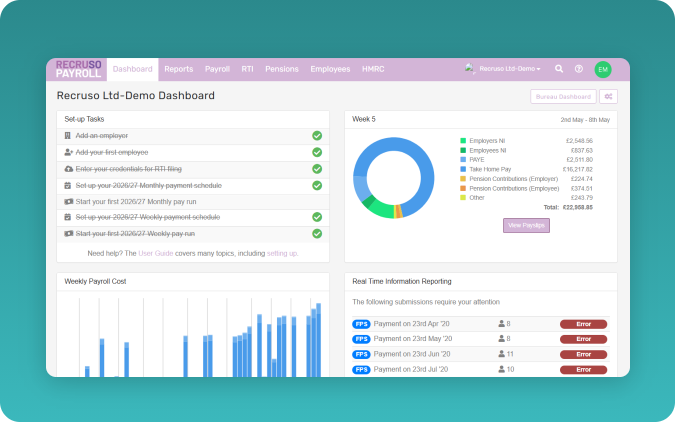
How staffing and shift fulfilment work in RECRUSO
RECRUSO connects the records used to move client staffing demand through worker assignment, completed work, approval, payroll and invoicing.
1.
Create or receive the staffing requirement.
Record the client, role, date, time and worker requirement using approved RECRUSO fields.
2.
Review worker records.
Check relevant worker information, availability and suitability criteria.
3.
Check required compliance information.
Review the applicable records before assignment.
4.
Assign workers to the booking.
Connect selected workers with the client requirement.
5.
Review fulfilment status.
Check whether the required staffing position has been reached using approved status names.
6.
Respond to changes.
Update the relevant booking or assignment records when requirements change.
7.
Record completed work.
Workers enter or submit start and finish times through the approved process.
8.
Review or approve hours.
The agency or client checks the relevant record.
9.
Prepare payroll records.
Approved staffing records continue into the payroll process.
10.
Prepare client billing.
Connected charge records support invoicing.
11.
Review operational reporting.
Include only approved reports, views and filters.
What each recruitment team can manage
RECRUSO connects staffing activity across the agency roles involved in booking, assigning, completing, approving and processing temporary work.
Recruitment consultants
Review worker and booking records and manage worker assignment to client requirements.

Booking or resourcing teams
Monitor staffing demand, worker readiness, assignment and fulfilment status.
Branch managers
Review branch booking activity and staffing gaps.
Operations teams
Manage process status, changes, exceptions and connected records.
Compliance teams
Review required worker information connected with staffing activity.
Payroll teams
Use approved hours and related records within payroll preparation.

Finance teams
Use connected charge and invoicing records.
Agency workers
Use approved Worker App functions, including personal or bank-detail updates, work-hour entry and driver availability records.
Clients
Review or approve relevant records where client access is available.
What should a recruitment agency check when choosing staffing software?
A recruitment agency should compare staffing software against its real booking, worker assignment, approval and pay-and-bill process. Ask each provider to show how its platform handles the following points.
- Is the software built around recruitment agency operations?
- Can it manage temporary worker and client booking records?
- How are staffing requirements created?
- Can requirements include more than one worker or shift?
- How are workers found and assessed for a booking?
- Which worker-availability records are supported?
- How are compliance requirements checked?
- How are workers assigned?
- Which booking and fulfilment statuses are available?
- Can teams see open, partly filled and filled demand?
- How are cancellations and replacements managed?
- How are workers told about assignments?
- Can workers accept or decline shifts?
- How are completed hours recorded?
- How do clients review or approve records?
- How do approved records reach payroll?
- How does client billing connect with completed work?
- Which reports and filters are available?
- What permissions and audit records are held?
- Which integrations are supported?
- What migration, onboarding and training are provided?
- Can the provider demonstrate your agency’s real booking process?
Staffing software FAQs
Staffing software helps recruitment agencies manage temporary workers, client requirements, bookings, assignments and the records attached to completed work. The functions included vary between providers.
Temporary staffing software supports recruitment activity connected with short-term, shift-based or booking-led work. Depending on the platform, this may include worker records, bookings, availability, compliance information, assignments, worked hours, approval, payroll and invoicing.
It gives the agency a connected process for recording demand, reviewing workers, assigning people to bookings and checking the fulfilment position. The exact matching, communication and status functions depend on the product.
Shift fulfilment is the process of moving from a client staffing requirement to the required worker position for the booking. It may include booking creation, worker review, assignment, coverage monitoring, changes and shift completion.
Recruso holds worker and booking records within its recruitment process and connects workers with booking and shift-fulfilment activity.
Yes. Invoicing forms part of the connected Recruso process.
No. Staffing software centres on temporary worker demand, bookings, assignment and connected work records. Recruitment CRM usually centres on candidate, client and relationship records. A platform may contain functions from both categories.
No. Staffing software for recruitment agencies is built around filling client staffing requirements with agency workers. Rota software is commonly used by employers scheduling their own internal workforce. Product-category boundaries vary.
Book a Recruso staffing software demonstration and bring an example of your current client requirement, worker-selection process, assignment steps, approval route and payroll hand-off.
See how RECRUSO manages your staffing workflow
Bring a real staffing scenario to a RECRUSO demonstration and review how the approved product process fits your agency. The demonstration can focus on the records and stages most relevant to your team. RECRUSO will need to review your requirements before confirming product fit.